
A social media page can attract thousands of followers and still feel empty. People may see the posts, but if their questions go unanswered, complaints are ignored or conversations receive only copy-and-paste replies, they have little reason to build a relationship with the brand. In 2026, businesses need more than a regular publishing schedule. They need a clear way to listen, respond and make customers feel that a real team is paying attention.
Social media community management is the ongoing process of building relationships with people who interact with a business online. It includes managing comments and direct messages, moderating discussions, answering customer questions, monitoring brand mentions and turning feedback into better experiences. This guide explains how to build a practical community management system for a business, even with a small team.
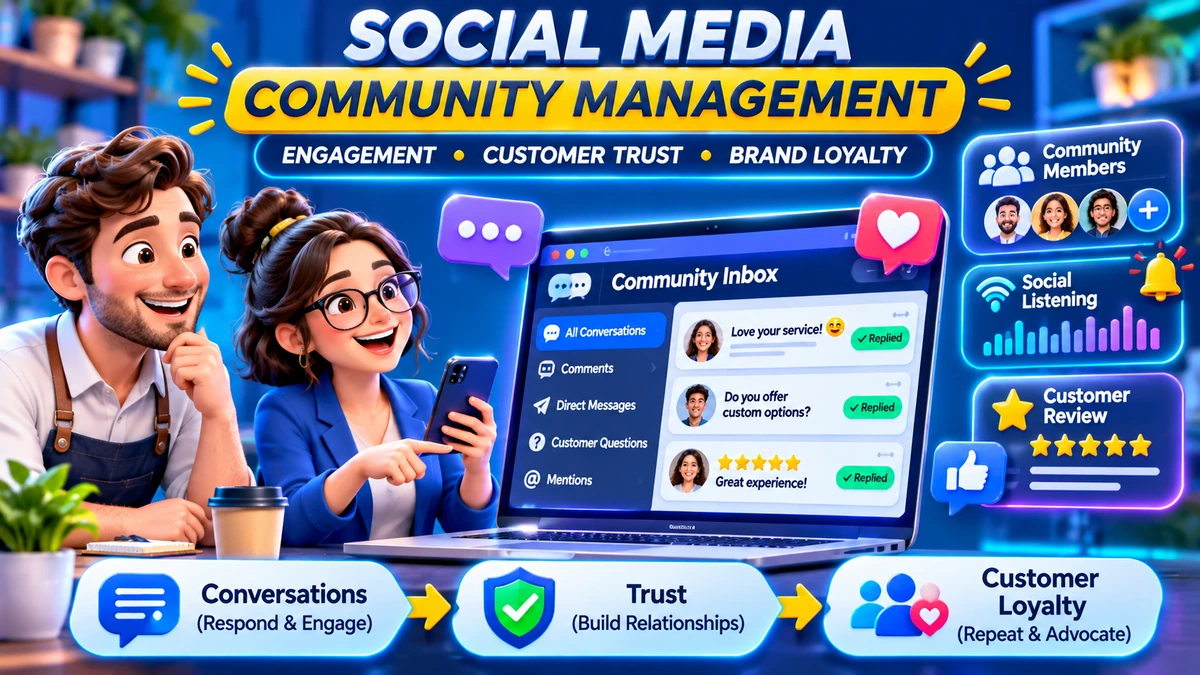
To manage a social media community effectively, choose the channels your customers use, define clear moderation rules, assign inbox ownership, respond with helpful and accurate information, listen for recurring themes and connect complex issues to customer support. Measure response coverage, resolution time and conversation quality—not just likes or follower count.
A healthy community runs on four connected actions
Publishing starts a conversation. Listening, responding and learning are what keep it moving.
1. What is social media community management?
Social media community management is the ongoing work of building relationships with people who interact with a brand across social platforms. It includes responding to comments and direct messages, answering questions, moderating conversations, recognizing loyal customers, listening to feedback and creating reasons for people to return. It is different from simply publishing posts. Publishing puts content in front of an audience; community management helps turn that audience into an active group of people who feel heard and valued. A community does not have to be a private group or a large follower base. It can form around the conversations taking place on an Instagram account, a Facebook Page, a LinkedIn company profile, a YouTube channel, a brand forum or a customer group. The important part is the relationship: people know where to ask questions, receive useful replies and take part in conversations without being treated as a sales target every time they comment.
2. Why community management matters for businesses in 2026
People increasingly use social platforms to research products, compare experiences, ask questions and decide whether a business is trustworthy. A thoughtful public reply can help the person who asked and also reassure everyone else reading the thread. A slow, defensive or generic response can have the opposite effect. Community management gives a business a consistent way to handle these everyday moments. It can support customer experience, brand reputation, product learning, retention and word of mouth. It also creates a feedback loop: recurring questions may reveal unclear website copy, repeated complaints may point to a delivery issue, and requests from customers may suggest a useful new product or content topic. The value is not measured only by likes. It can appear in fewer unresolved questions, better customer sentiment, useful product insights and more people choosing to return. In 2026, the challenge is not simply to be present on every platform. It is to manage conversations across the channels that matter, use automation carefully, keep a consistent brand voice and make sure people can reach a real person when the situation needs judgment.
3. Social media marketing vs community management
Social media marketing usually covers the wider plan: goals, content, distribution, campaigns, partnerships, paid promotion and measurement. Community management is the relationship-focused part of that work. It handles the conversations that happen before, during and after content is published. The two should work together. A campaign may attract new people, but the way a brand responds to questions helps shape their first impression. A product video may generate comments that reveal confusion about pricing or features. A community manager can surface that feedback to the marketing, sales or product team. This makes community management more than a moderation task; it is a practical connection between the audience and the business.
4. Choose the platforms where your customers actually talk
A business does not need to manage every social network equally. Choose platforms based on where customers ask questions, share recommendations and discuss the category. A local service business may receive most enquiries through Instagram and Facebook. A B2B company may need to pay closer attention to LinkedIn. A video-led creator brand may receive its most useful feedback on YouTube or TikTok. Review the conversations already happening rather than choosing channels only because they are popular. Look at the quality of questions, the relevance of the audience, the team's ability to respond and whether the platform supports the formats your customers use. Start with one or two priority channels and build a reliable response process before expanding. For each platform, define its role. One channel might be best for public product education, another for short customer updates, and another for professional discussions. Make sure profile descriptions, contact details, links and pinned information tell people where to go for support. If a channel is not actively managed, do not leave the impression that it is a dependable customer service route.
Official reference: LinkedIn Pages best practices
5. Understand what your audience expects from a brand
Different communities have different expectations. Some people want fast answers about availability, delivery or pricing. Others want expert advice, practical tutorials or a place to exchange experiences. A brand should understand the reason people follow it before deciding what engagement should look like. Review common questions, comment themes, frequently shared posts, customer reviews and direct-message topics. Group these into themes such as product information, troubleshooting, inspiration, complaints, feedback and purchase intent. This gives the team a clearer picture of what the audience needs and helps shape useful content. Avoid assuming that every follower is a potential buyer. Some people are existing customers, some are researching, some are industry peers and others simply enjoy the content. A community feels more genuine when the brand responds to the actual conversation rather than forcing every interaction toward a sale.
6. Create clear community guidelines and moderation rules
Healthy communities need clear boundaries. Publish concise guidelines that explain what kind of participation is welcome and what may be removed. Common rules include no hate speech, threats, harassment, spam, impersonation, doxxing or repeated off-topic promotion. Make the rules easy to find and apply them consistently. Build an internal moderation policy too. It should explain who can hide or remove content, when to warn a user, when to block or report an account and when to escalate a serious issue. Keep a record of moderation decisions where appropriate, especially when multiple people manage the same account. Do not remove fair criticism simply because it is negative. Criticism can be an opportunity to clarify a problem and demonstrate accountability. Threats, personal information, suspected fraud, safety concerns and legal allegations need a different response from ordinary disagreement. Staff should know when to stop replying publicly and pass the matter to the appropriate person.
Official reference: Meta Community Standards
7. Build a reliable comment and DM response system
A response system prevents important conversations from being missed. Decide who checks each inbox, how often it is reviewed, which topics can be answered with approved information and which must be escalated. Use labels or categories such as new enquiry, existing customer, product question, complaint, spam and follow-up required. Create response guidance rather than forcing every reply into a rigid script. A useful response usually acknowledges the person's point, answers the question clearly and explains the next step. If the issue needs private information, invite the person to a secure support channel without asking them to post order numbers, phone numbers, addresses or other personal details publicly. Set realistic response targets based on staffing and channel volume. A small business should not promise instant replies if nobody is available to provide them. Publish support hours where useful, and make sure automated acknowledgements do not imply that a human has already reviewed the message.
Official reference: Meta Business Suite Inbox instructions
8. How to respond to positive comments, questions and complaints
Positive comments deserve more than an automatic emoji when a personal reply is practical. Thank the person, refer to the detail they mentioned and invite them to share more if it fits the conversation. For a useful question, answer directly and avoid sending people through several links when the answer can be provided in the thread. For a complaint, stay calm and do not argue about the customer's experience. Acknowledge the issue, ask only for the information needed to investigate and move sensitive details to a private support channel. If the business made a mistake, explain what will happen next rather than hiding behind a vague apology. When the issue is resolved, follow up where appropriate. Do not promise refunds, replacements, delivery dates or technical fixes unless the person replying has authority and accurate information. If the answer is not known, say that it needs checking and give a realistic time for an update. A clear, honest reply is more useful than a confident but incorrect one.
10. Turn repeated questions into useful social content
Repeated questions are a content research source. If people regularly ask how a service works, what a product includes, how long a process takes or how to solve a common problem, create a post, short video, carousel or FAQ that answers it clearly. This can reduce repetitive enquiries and help people who have not yet contacted the brand. Keep a running list of questions and group them by theme. Prioritize topics that are common, important to customers or connected to confusion in the buying journey. Share the draft answer with the team responsible for the product or service so details remain accurate. When a question is answered in a public thread, link to the fuller resource only if it genuinely adds value. This creates a useful cycle: conversations reveal information needs, content answers those needs, and the next set of conversations shows whether the explanation worked.
11. Keep a consistent brand voice without sounding robotic
A community manager may write dozens of replies in a day, but the account should still sound like one recognizable brand. Define a few voice principles such as friendly, clear, practical, calm or expert. Add examples of phrases the brand uses and phrases it avoids. Include guidance for difficult conversations, humor, emojis and regional language. Consistency does not mean every reply should sound identical. A quick thank-you can be short, while a complicated complaint needs a careful explanation. Avoid overusing canned phrases such as “We value your feedback” when they do not address the actual issue. Templates are best used for structure and factual consistency, then adapted to the person's question. If several employees manage the same account, document who can speak on behalf of the business and how sensitive responses are approved. This reduces conflicting information and helps the brand maintain a dependable tone.
12. Use AI and automation carefully in community management
AI tools can help classify incoming messages, summarize long threads, suggest draft replies, identify recurring themes and route conversations to the right team. Automation can also acknowledge a message, share support hours or direct a person to a relevant help page. These uses can save time when they are designed around a clear workflow. However, automated replies should not pretend to be a human conversation. Do not let an AI system invent policies, make commitments, disclose customer data or handle sensitive complaints without appropriate review. Keep a human escalation route visible. Test automated flows with realistic questions, unusual wording, multilingual messages and situations where the correct answer is “we need to check.” Review the accuracy and tone of AI-assisted replies before they are sent, especially for refunds, safety issues, legal matters, health-related questions or account access. Keep personal data out of prompts and tools that are not approved for that information. The aim is to reduce repetitive work while preserving human judgment where it matters.
13. Connect social media conversations with customer support
Social media teams should not operate as an isolated support desk. Agree how a conversation moves from a public comment to private support, and how the support team sends an update back to the community manager. Use an approved CRM, helpdesk or shared workflow when message volume justifies it. Record only the information needed to resolve the issue and follow the business's retention and privacy rules. Create escalation paths for order problems, billing disputes, technical faults, account security, delivery delays and serious complaints. Each path should identify the responsible team, the information needed and the expected next update. If the social team cannot see the status of a case, it should not guess or give the customer a false assurance. Where a platform does not support a suitable integration, use a secure and documented manual handoff. Avoid copying personal details into public notes, spreadsheets with broad access or unofficial messaging groups.
14. Build loyalty without asking for constant promotion
A strong community gives customers reasons to stay connected even when they are not ready to buy. Share useful knowledge, recognize thoughtful contributions, invite feedback and make it easy for people to learn from one another. Highlight customer stories only with permission and represent their experience accurately. Loyalty grows through repeated positive experiences: a helpful answer, a fair resolution, a product improvement based on feedback or a conversation that makes someone feel included. Do not treat every interaction as a chance to request a review, referral or user-generated post. Too many promotional requests can make a community feel transactional. If you run a customer group or ambassador programme, explain eligibility, expectations, benefits and disclosure requirements. Make sure incentives do not require people to give misleading reviews or hide a commercial relationship. Genuine advocacy is earned through trust, not manufactured through pressure.
15. Prepare a social media response plan for difficult situations
A complaint can become a wider reputation issue when many people share the same concern or when a post spreads quickly. Prepare a simple escalation plan before a crisis occurs. Define what counts as a routine complaint, a service incident, a safety issue or a potential legal matter. Identify the person authorized to approve public statements and the teams that need to be informed. During an incident, verify facts before replying. Acknowledge what is known, avoid speculation and explain when the next update will be provided. Do not delete legitimate criticism simply to reduce visibility. Remove content only when it breaches published rules or creates a safety or privacy risk, and document significant moderation actions. Use one approved source of truth for updates so different employees do not publish conflicting explanations. After the situation is resolved, review what people asked, which information was missing and how the response process can improve.
16. Measure community management with meaningful metrics
Follower count and total likes do not show whether a community is being managed well. Track a small set of metrics connected to the experience you want to improve. Useful measures include response time, response coverage, unresolved conversation volume, resolution time, repeat questions, sentiment themes, meaningful engagement and customer feedback after support interactions. Define each metric consistently. Response time might measure the time from a customer message to the first useful human reply, not an automatic acknowledgement. Response coverage might be the share of eligible questions that receive a reply. Resolution time should distinguish between a first response and the actual completion of the issue. Use qualitative review alongside numbers. A post may receive fewer comments but generate better questions. A negative sentiment trend may reflect a real product issue rather than poor moderation. Read samples of conversations and connect recurring themes to business outcomes where possible. Avoid treating sentiment scores from automated tools as definitive judgments.
Official reference: Google Search Central: helpful, reliable content
See how a community report can tell a story
Hover or tap a chart point to inspect the example. The values below are fictional sample data to demonstrate a reporting layout—not industry benchmarks or promised results.
What to look for: investigate why conversation volume changes. A spike may reflect a useful campaign, a recurring customer issue or a service incident. Volume alone does not tell you whether the conversations were positive or resolved.
17. Create a simple weekly community management report
A weekly report should help the team decide what to do next. Include the number of conversations received, response coverage, median or average first-response time, unresolved cases, recurring questions, common complaint themes and examples of useful feedback. Separate public comments, direct messages and support escalations if the workflows differ. Add a short interpretation: what changed, why it may have changed and what action is recommended. For example, a rise in questions about delivery may point to unclear shipping information, while repeated confusion about a product feature may call for a demonstration video. Avoid reporting numbers without explaining their meaning. Keep the report proportionate to the size of the business. A small company may need one shared weekly document, not a complex analytics platform. The best report is one that the team reviews and uses to improve the customer experience.
18. Common community management mistakes to avoid
Common mistakes include replying with generic scripts that ignore the question, deleting fair criticism, arguing with customers in public, promising outcomes without authority, leaving direct messages unanswered, treating every platform the same and measuring success only through follower growth. Another mistake is using automation without a clear handoff to a person. Some businesses also focus on engagement volume instead of conversation quality. A controversial post can attract many comments but damage trust. A smaller thread that answers a genuine customer question may be more valuable. Do not buy fake engagement, create artificial testimonials or ask employees to pose as independent customers. These shortcuts distort feedback and undermine credibility. Finally, do not launch a community space without assigning someone to manage it. An abandoned group or unanswered support inbox can create a worse impression than having no community channel at all.
19. A practical 90-day community management plan
Days 1–30: Audit the channels the business already uses. Review comments, direct messages, public mentions and reviews. Identify common questions and pain points. Choose priority channels, write community guidelines, define escalation contacts and agree on realistic response targets. Create a basic log for recurring themes. Days 31–60: Put the response workflow into practice. Set up labels, approved information, support handoffs and a simple weekly report. Train everyone who replies on tone, privacy and moderation. Publish content that answers repeated questions. Review whether customers can find support information easily. Days 61–90: Evaluate the quality of conversations and the workload. Identify unresolved topics, recurring complaints and opportunities to improve the product, website or service. Adjust response targets and channel priorities based on actual demand. Add automation only where the process is already clear and safe. At the end of the period, document what improved and set the next quarter's priorities. This plan is a starting point, not a universal timetable. A business with a high message volume or regulated customer interactions may need dedicated staff, specialist tools and formal review before making changes.
Three small habits that make a community feel human
As you scroll, each card clears its frosted layer to reveal a practical action. These are examples to adapt—not universal rules.
Remember the context
When someone returns with a follow-up, read the earlier conversation before asking them to repeat the same details.
Better continuityClose the loop
If you say you will check something, return with the answer—even when the update is that the issue is still being investigated.
Reliable follow-throughShare what changed
When feedback leads to a clearer guide, product fix or policy update, tell the community what improved and why.
Visible listening20. How small businesses can manage a community with limited time
A small business does not need a large social media team to be responsive. Start by choosing the two channels that generate the most useful conversations. Set specific times to review messages, assign one person as the owner and create a short reference sheet for common questions. Make sure someone can cover urgent issues when the main person is unavailable. Use pinned posts and profile information to answer recurring questions about hours, location, service areas, pricing approach and support routes. A clear FAQ can reduce repetitive messages, but it should not replace a personal reply when someone needs help. Schedule content in advance so daily publishing does not consume all the time available for conversation. If message volume grows, consider a shared inbox or helpdesk integration. Before buying a tool, map the current process and identify the actual problem: missed messages, duplicate replies, poor handoffs or lack of reporting. Software is useful when it improves a workflow, not simply because it has many features.
21. Protect customer privacy in public conversations
Social media conversations can contain order details, phone numbers, addresses, email addresses, screenshots and other personal information. Ask people not to post sensitive details publicly. Move account-specific issues to a secure support channel and collect only the information needed to resolve the request. Limit access to inboxes and customer records to staff who need it. Avoid sharing screenshots of private conversations in public posts unless the customer has clearly agreed and identifying details are removed. Follow applicable privacy law, platform policies and internal retention rules. If a customer asks for data deletion or account access, route the request through the business's approved process rather than making promises in a comment thread. Community managers should also be careful with social listening. Publicly visible information is not automatically appropriate to copy, store indefinitely or use for unrelated targeting. Respect context and use data proportionately.
22. Community management workflow checklist
Before the week begins, confirm who owns each channel and who covers absences. Check that support links, opening hours and pinned information are current. Review the escalation contacts and approved information for common enquiries. During the week, review incoming conversations at the agreed times, categorize messages, answer what can be answered accurately and hand off cases that need specialist support. Remove spam and rule-breaking content consistently, while allowing fair criticism. Record recurring questions and notable feedback without collecting unnecessary personal information. At the end of the week, review response coverage, unresolved conversations and repeated themes. Share useful insights with the relevant business teams and choose one practical improvement for the next week. A small, reliable routine is more valuable than a complicated process that nobody follows.
Conclusion: turn social media conversations into lasting relationships
Social media community management is the work that turns an audience into a relationship. It requires more than quick replies: businesses need clear guidelines, useful conversations, reliable support handoffs, careful moderation, social listening and a consistent way to learn from feedback. Start with the channels your customers already use. Understand what they need, respond with clarity and empathy, protect personal information and know when a conversation must be escalated. Use AI and automation to support repetitive tasks, but keep human judgment available for sensitive or complicated issues. Measure response quality and unresolved needs rather than relying only on likes and follower counts. When a business consistently listens and follows through, social media becomes more than a place to publish promotions. It becomes a practical way to earn trust, improve customer experience and build loyalty over time.
23. A simple channel ownership framework
Use a short ownership plan so conversations do not fall between teams. The same person does not have to answer every message, but every channel should have a named owner and a clear backup.
| Conversation type | First owner | Escalate when |
|---|---|---|
| General comments and product questions | Community manager | Answer needs technical or policy confirmation |
| Orders, billing and delivery | Customer support | There is a dispute or unresolved service issue |
| Product defects and technical faults | Support or product team | Multiple customers report the same fault |
| Threats, privacy or safety concerns | Designated escalation lead | Immediately, under the incident process |
| Press, partnerships and creator requests | Marketing or communications | Approval or contract review is needed |
Adapt the ownership model to the size of the business. The important point is that the person replying knows what they can resolve, what they must pass on and how the customer will receive an update.
24. Example weekly community scorecard
A lightweight scorecard can make the process measurable without turning every conversation into a performance target. The figures below are example fields to track, not industry benchmarks.
25. Frequently asked questions about social media community management
What is social media community management?
It is the process of building relationships with people who interact with a brand on social platforms. It includes responding to comments and messages, moderating discussions, listening to feedback and helping customers find useful answers.
What is the difference between social media management and community management?
Social media management covers the wider activity of planning and publishing content, campaigns and reporting. Community management focuses on the conversations and relationships that develop around those activities.
Why is community management important for small businesses?
It helps small businesses answer customer questions, address concerns, understand recurring needs and build trust. A consistent process can improve the experience without requiring a large social media team.
Which platforms need community management?
Prioritize the platforms where customers already ask questions and discuss the business. Depending on the audience, this may include Facebook, Instagram, LinkedIn, TikTok, YouTube or a brand community space.
How quickly should a business reply to social media messages?
Set a realistic target based on message volume, staffing and customer expectations. Publish support hours where useful, and do not promise instant replies if nobody is available to provide them.
What is social listening?
Social listening means monitoring relevant public conversations beyond a brand’s own posts to understand recurring topics, customer concerns, brand mentions and industry discussions.
Can AI manage social media communities?
AI can help categorize messages, summarize conversations and draft routine replies. Human review and escalation remain important for complaints, sensitive information, policy questions and decisions that require judgment.
How do you measure community management success?
Track response coverage, first useful response time, resolution time, unresolved cases, recurring themes and customer feedback. Use qualitative review as well as metrics, and avoid relying only on likes or follower growth.
Should negative comments be deleted?
Do not remove fair criticism simply because it is negative. Moderate content that breaches clear rules, such as harassment, threats, spam or exposure of private information, and apply the rules consistently.
How can a small business manage a community with limited time?
Focus on the one or two channels that generate the most valuable conversations, assign an owner, set review times, prepare accurate answers to common questions and use a simple escalation process.
Final thoughts
Community management is not about replying to every comment with the same sentence. It is about making sure people can reach the business, receive accurate answers and see that their feedback matters. Start with a manageable workflow, review what customers are telling you and improve the process as the community grows.
For businesses investing in social media marketing, a reliable community management process helps turn attention into stronger customer relationships. Consistent listening and follow-through are what make those relationships last.
Turn attention into meaningful audience relationships
Explore TopRank Solution's digital promotion services and choose a package that fits your current growth goals. Review the scope and deliverables before ordering.
Explore social media & digital servicesSee available services and package details Promotion outcomes depend on platform rules, audience, content and campaign conditions. No engagement result is guaranteed.Go deeper with official platform guidance
Use platform documentation for current tools and policy details. Features and interface labels can change, so confirm the latest instructions before updating your workflow.
External resources are provided for reference. TopRank Solution is not affiliated with or endorsed by the organizations linked above.
Build a stronger social media presence
Explore social media promotion and digital marketing services from TopRank Solution to support your brand visibility and audience growth.
Explore social media servicesSocial media marketing, website development and digital growth.
← Back to all articles
9. Use social listening to understand conversations beyond your own page
Community management is not limited to comments on a brand's own posts. People may discuss a business, product category or customer problem in public posts, review sites, creator videos and relevant communities without tagging the official account. Social listening is the process of tracking these broader conversations to understand recurring topics, questions, sentiment and emerging issues. Begin with a small set of relevant brand names, product names, common misspellings and category phrases. Add competitor or industry terms only when there is a clear research purpose. Review the context before responding: a mention may be a recommendation, a joke, a complaint or a conversation where the brand has no useful reason to enter. Social listening is not a reason to intrude into every discussion. Join only when the response is relevant, helpful and respectful. Never pretend to be an ordinary customer, create fake praise or use private information to target someone. Treat public conversation data responsibly and follow platform rules and privacy requirements.